The Chart of Accounts window
Who this page is for
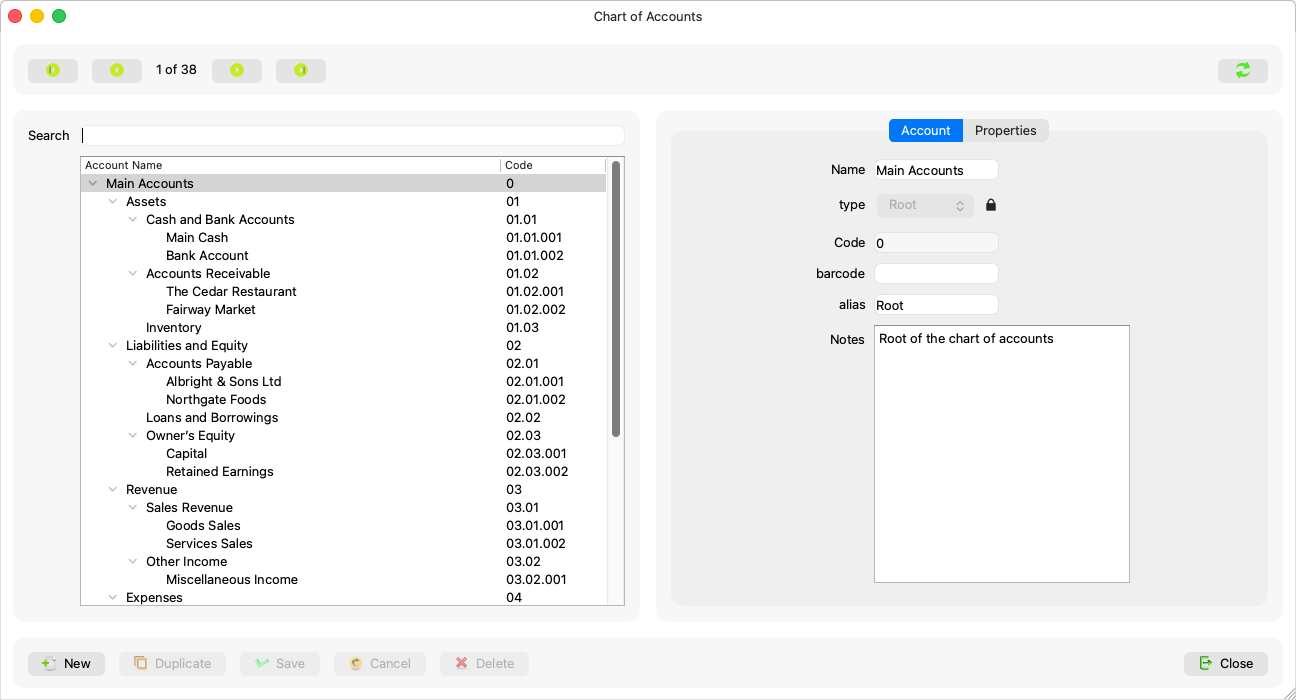
Anyone who browses or manages the account tree. It opens from Master Data ← Chart of Accounts. A new database comes with a ready-made standard chart in the main data language — you add under it and adjust, you never start from nothing.
What you need first
- An open group — the chart belongs to the whole group, so no entity is needed.
The tree and the search
One side of the window holds the chart tree: the code and the account name. The search field above it filters by name or code and keeps every match's ancestors visible, so a result never loses its place in the tree; the navigation buttons and the “{current} of {total}” position follow what the filter shows.
Selecting a node shows it on the form, and a right-click on the tree offers “Add sub-account” for the node under the cursor.
The account's fields
| Field | What it means |
|---|---|
| Name | The account's name; required (“An account needs a name.”) and editable on every account. |
| Code | “The code is given by the server and cannot be typed.” — display only, generated on creation. |
| Type | Root / group / account: a group gathers and takes no postings, while a posting account is what entry lines book against. A type lock shows as a small padlock beside the field with its reason as the tooltip — Editing an account. |
| Alias, Barcode and Notes | Free fields, editable on every account — there is no such thing as a locked one of these. |
The Properties tab holds the account's settings — Account properties.
What the server decides
Every account arrives with the server's decisions: whether it can be deleted, whether its type can change, and whether it is “Part of the standard chart of accounts.” The window shows what is not allowed as disabled with the reason in its tooltip, and never guesses anything from the shape of the code.