Creating the database
Who this page is for
Anyone creating a group's books for the first time. A new group comes without a database; this screen creates it and fills it with the starting data: a chart of accounts, the first entity, the currencies, and the accounting periods.
What you need first
- A group with an active subscription and no database yet (the Database Created column in the Database List).
- The server checks the permission; if the creation is refused, ask the group's administrator.
- Three decisions that are hard to change later — know them before you start: the main currency, the month the fiscal year starts in, and the language of the starting data.
Steps
-
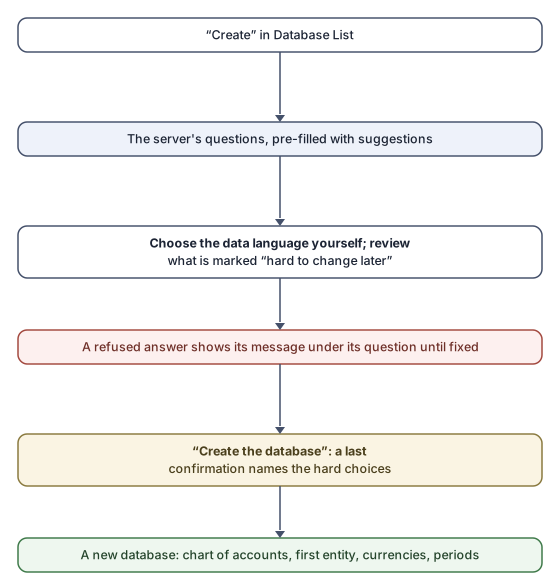
File → Database List, choose the group, then press Create.
-
The “Set up the new database” window opens:
“Before the database is created, choose what it starts with. The suggestions follow your earlier answers; change only what does not fit.”
The questions come from the server, in its order, and every question is filled with a fitting suggestion — except the data language, which is chosen by hand (see below).
-
Review every question and change what needs changing. Whatever is marked “Hard to change later — choose carefully.” deserves a second look.
-
Press Create the database. The application asks one last question naming the hard-to-change choices:
“These choices are hard to change once the books hold data: {choices} Create the database with them?”
-
Confirm. “The database was created.” appears, the groups are read again, and the new group is selected.
Fields explained
| Question | What it means |
|---|---|
| Country | “Where the business is registered. It decides the payment details and the payment reference printed on sales invoices, and suggests the currency and language below. Can be changed later in the settings; invoices already issued keep their reference.” |
| Payment details | Shown per country: for Sweden, Bankgiro, Plusgiro and the “OCR length digit”; for Germany, IBAN and BIC. “Optional now; a sales invoice cannot be issued until they are set. Can be changed later in the settings.” |
| Main currency | “The currency the books are kept in. It cannot be changed once anything has been posted.” |
| Language of the starting data | The language the chart of accounts, the first entity and the currencies are created in, which becomes the group's main data language: every product, category and unit must be named in it. Other languages can be added later. |
| Fiscal year starts in | “The month the financial year begins; the accounting periods are created from it. It cannot be changed once anything has been posted.” |
The data language is always chosen by hand: its field starts on “(choose)” and the suggestion is only marked “(suggested)”, because it becomes the group's main data language and no suggestion is adopted for a decision of that weight. The create button waits until you choose it, with the message: “Choose the language of the starting data first: it becomes the group's main data language.”
Rules and refusals
- Every refused answer shows its message under its question (“This is not a valid IBAN.”, “Choose a month from January to December.”, …). Correct it and carry on; the application checks back with the server after every change.
- “This version of al-Shamil cannot ask this question yet. Update the app, or create the database from Konzepti.” — the server added a question your version does not know.
- “The setup questions could not be loaded. Check the connection and try again.” — the Try again button reads them again.
Common mistakes
- Accepting the fiscal-year month without thinking. It is hard to change after the first posting; ask your accountant if unsure.
- Choosing a data language the people entering the names do not master. Every product, category and unit must be named in it.
- Leaving the payment details for later and forgetting them, so the first sales invoice is refused. They are completed in Accounting Settings, on the Company tab.