Closing a period
Who this page is for
For whoever finishes a month: posts its drafts and then shuts it to further bookkeeping. What closing means follows the accounting level: at Professional it is a lock that refuses bookkeeping until a reopen; at Simple it is housekeeping — booking into a closed period asks, then reopens it.
Steps
- Select the period in the months table.
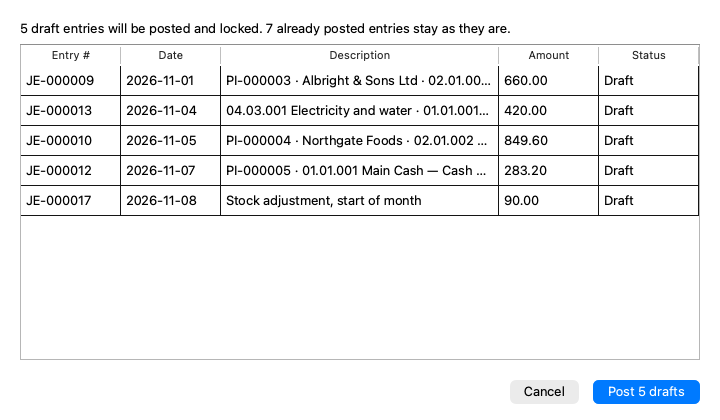
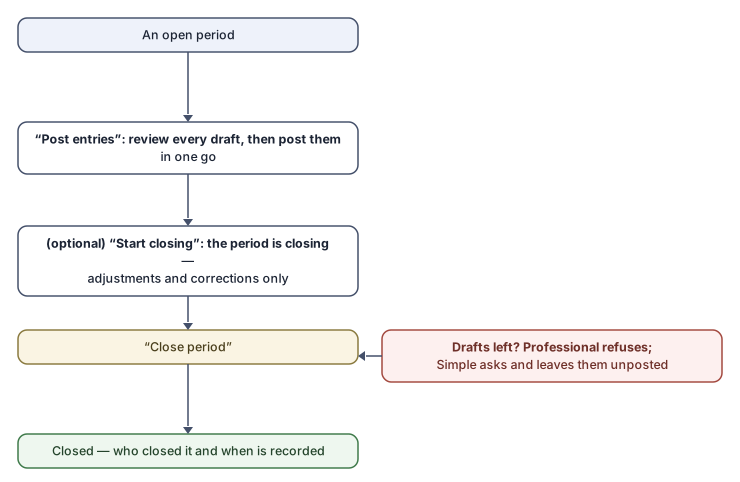
- Post its drafts: the Post entries button reads the period afresh, fetches every draft and shows them all for review in the “Post the entries of {name}” dialog — “{drafts} draft entries will be posted and locked. {posted} already posted entries stay as they are.” — then its “Post {count} drafts” button posts them in one transaction: all of them or none. Afterwards: “{count} entries of {name} are posted and locked.”
- (Optional, for the Professional level) Start closing: the period turns “Closing” and takes only adjustment and correction entries while you review the month.
- Close period. The status turns Closed, and who closed it and when is recorded.
The “Ready to close” card reaches the same steps through its Close now button.
When the period still holds drafts
- Professional: the close is refused — “Draft entries are still in this period. Post or delete them first.” with the list beneath: “{count} draft entries in {name} have to be posted or deleted before it can close.”
- Simple: a question — “{drafts} draft entries in {name} will stay unposted. Close it anyway?” — closing there posts nothing on your behalf.
Rules and refusals
| Message | Meaning |
|---|---|
| “Some drafts in this period cannot be posted, so nothing was posted. Fix them and try again.” | The batch posts all or nothing; each stuck draft is listed with its reason — “debits and credits do not balance”, “fewer than two lines”, “its type, Closing, is the year-end close's”… |
| “Nothing was posted: the drafts of {name} changed while they were read for review ({listed} read, {expected} in the period). Try again.” | A colleague added or removed a draft during the review. |
| “Only an open period can start closing.” / “This period is already closed.” | The state moved before you; refresh. |
| “Close the fiscal year {year} first: its close books the opening entry into this month.” | The first month of a new year while the previous year is still open — close the year first. |
| “This month belongs to a closed fiscal year. Reopen the year first, on the Fiscal years tab.” | A closed year's months follow it. |
Common mistakes
- Closing before reviewing “Unposted entries” at Simple, leaving drafts out of the books.
- Expecting the close to block bookkeeping at Simple — there, booking asks “…which you closed. Save the entry anyway? The period will be reopened.” and the history records “(automatic, from a journal entry)”.