The Products window
Who this page is for
Anyone managing the catalogue: “Products and services: tax rate, base unit, unit factors and sales prices”. It opens from Master Data ← Products. It needs a group, no entity.
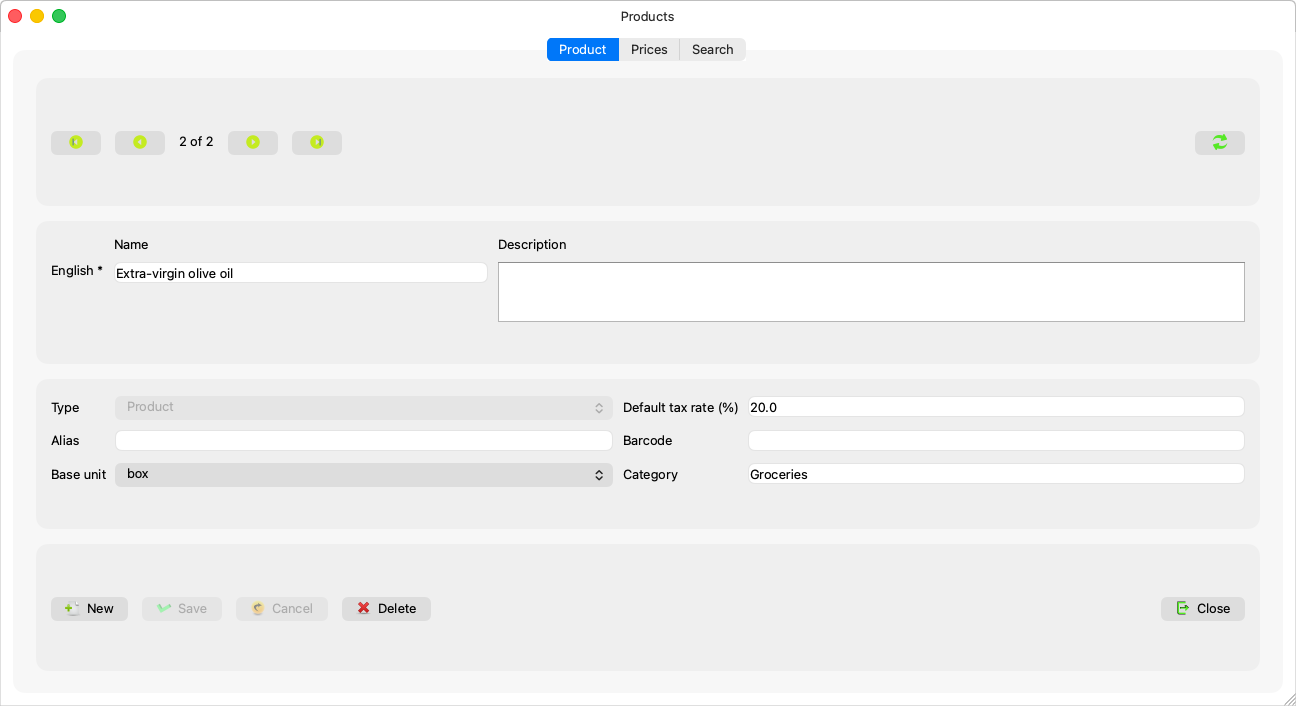
The four kinds
| Kind | What it means |
|---|---|
| Product | A good that is bought and sold — the default. |
| Service | Work that is sold (it appears on sales invoices as a catalogue product — a separate services section on the invoice comes later). |
| Subscription | A recurring service. |
| Menu item | A Konzepti restaurant-menu item — Restaurant menu items. |
The kind is chosen at creation and never changes afterwards (“A product's type cannot be changed.”) — the combo is disabled after the first save.
Fields explained
| Field | What it means |
|---|---|
| Names | One row per data language, the main one required — as in Units. |
| Type | Above. |
| Category | “Type to search the categories” — a live search over the Categories tree; empty means no category. |
| Base unit | The unit the product is counted in; the unit factors and prices on the Prices tab build on it. Changing it later warns: “The unit factors are counted in {unit}. Check them after changing the base unit.” |
| Default tax rate (%) | Pre-fills the invoice lines that pick this product; “The tax rate must be between 0 and 100.” and empty means no suggested rate. |
| Alias and barcode | For searching and matching. |
A long unit catalogue is cut with a note: “Only the first {count} units can be chosen on a line: units added after them are not offered yet.”
The Prices and Search tabs
- Prices — Product prices and unit factors. Disabled on an unsaved product (“Save the product first: a price belongs to a saved product.”) and while the form has changes (“Save or discard the product's changes first, then edit its prices.”).
- Search — “Search a name in any language, an alias or a barcode”; one name column per data language; twenty results.
Rules and refusals
- Saving sends only what you changed — deliberate design that keeps the other languages' names from being overwritten; you will not notice it, but it explains why a blind save never "fixes" a field you did not touch.
- “This product is used on invoices, so it cannot be deleted.” — the catalogue keeps its history.
- “That category no longer exists.” / “A unit no longer exists. Reopen the product.” — someone got there before you.
Common mistakes
- The wrong kind at creation — it cannot be corrected later; create the product again with the right kind.
- Forgetting the tax rate: lines will start without one, typed by hand on every invoice.