Deleting an account
Who this page is for
Anyone cleaning an account out of the chart. Deleting is for accounts that left no trace: anything that was ever used stays, because the books point at it.
Steps
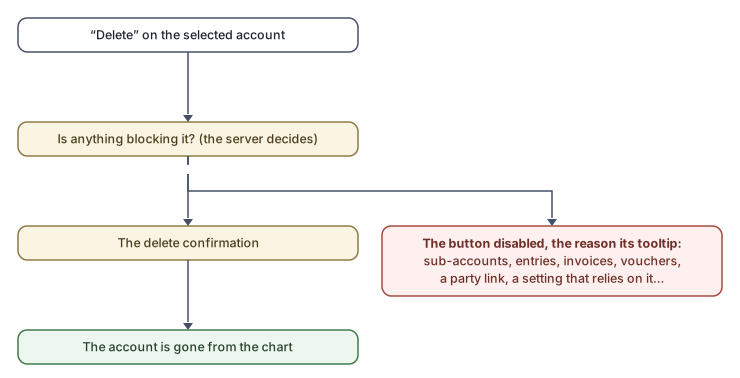
- Select the account in the tree.
- If the Delete button is disabled, the reason is its tooltip — the table below.
- Otherwise press it and confirm the question. The account is deleted and the tree refreshed.
Delete blockers
The server decides them and sends them with every account; the main ones:
| Blocker | What to do |
|---|---|
| “The root of the chart cannot be removed.” | — |
| “It has sub-accounts. Delete those first.” | Bottom up. |
| “Journal entries use this account.” / “Invoices use this account.” / “Payments use this account.” | A trace in the books; the account stays. |
| “This account belongs to a vendor or customer, so it stays a posting account and cannot be deleted.” | Unlink it there first (if it has no activity) — the link lives in Master Data ← Vendors or Customers. |
| “Invoices are booked against this account as a vendor's or customer's account, voided ones included, so it stays.” | Even voided invoices keep it. |
| “New vendor accounts are created under this group, so it stays a group and cannot be deleted. Choose another group in System Settings (Master Data → Accounting Settings) first.” (likewise customers, the two VAT accounts, and the two default posting accounts) | Free the setting that depends on it in Accounting Settings, then delete. |
| “Part of the standard chart of accounts.” | The standard chart is not deleted. |
A blocker the window does not know reads generically: “The server does not allow deleting this account ({code}).” — so an empty tooltip never appears.
Common mistakes
- Deleting a seemingly spare account with old activity — it will not pass; rename it or make it clearly disused instead.
- Forgetting that the settings hold accounts: a “Choose another one in System Settings first” blocker is solved by changing the setting, not by trying again.