Resetting the database
Who this page is for
For the group administrator who has finished the trial and wants to start afresh — or to turn the trial into clean real books. “The current books are set aside, not deleted, and a new database starts with the answers above.”
What you need first
- The Reset database button in the
Database List.
The button never disappears; when it is disabled, the reason is in its
tooltip:
- “Only a group administrator can reset the database.”
- “The group's subscription is not active, so its database cannot be reset.”
- “Data has been entered in this database since it was set up ({tables}), so it holds real books and cannot be reset.” — used real books are protected for good.
- “This database was set up before resets were possible, so it cannot be reset.” / “The group is frozen, so its database cannot be reset.”
Steps
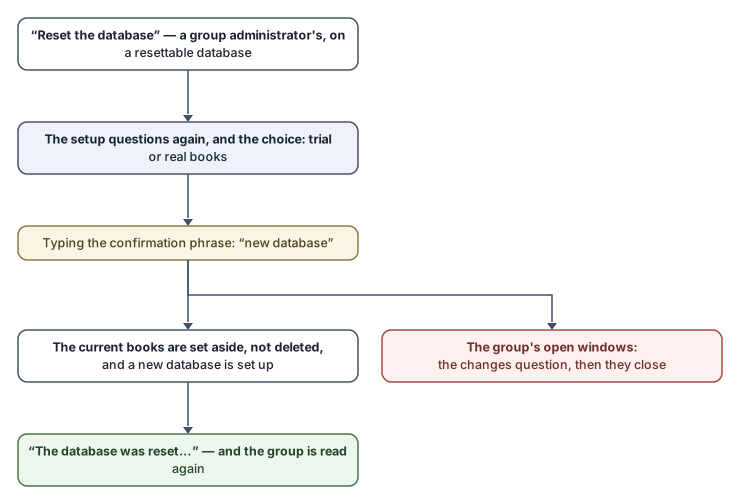
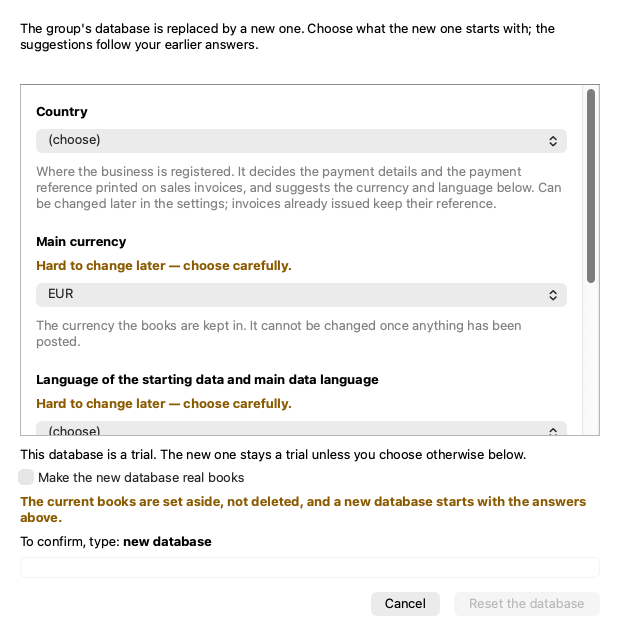
- Choose the group and press the button. The Reset the database window opens: “The group's database is replaced by a new one. Choose what the new one starts with; the suggestions follow your earlier answers.”
- The setup questions are the same as in Creating the database (the country, the currency, the data language — chosen by hand —, the fiscal-year month). They start from the server's suggestions, not from the current database's choices, so review all of them.
- Trial or real: a line states the current database's standing — “This database is a trial. The new one stays a trial unless you choose otherwise below.” — with the checkbox “Make the new database real books” and its warning: “Real books are not a trial: once anything is entered in them, they can never be reset.” (And the reverse for real books still untouched.)
- Type the confirmation phrase: “To confirm, type: {phrase}” — the phrase is “new database”, in your interface language, so no reset ever happens on a stray click.
- Confirm. If the group's windows are open, the unsaved-changes question comes first (“Resetting the group's database closes every window that works in it…”) — Go back sends nothing.
What you see next
The status bar states the outcome: “The database was reset. The new one is a trial.” or “The database was reset. The new one is real books.” — the group is read again, and the marks follow the new standing. The selected entity, the last-save dates and whatever was remembered for the old group are forgotten: the new database starts clean.
Rules and refusals
Every refusal is a sentence that says outright that nothing changed:
| Message | What it means |
|---|---|
| “Type the phrase above to confirm.” | The phrase is missing or different. |
| “The reset could not be confirmed. Nothing was changed; try again.” | The confirmation did not match what the server knows. |
| “Another change to this database is running. Nothing was changed; wait a minute and try again.” / “The database is being written to right now. Nothing was changed; try again in a minute.” | Concurrency; wait and retry. |
| “The new database could not be set up. The current books are unchanged; try again, or contact the support team.” | The setup failed with the books intact. |
| A refused question answer | Shows under its question, as in creation. |
And when no answer arrives (a disconnection or a timeout), the application does not guess: it reads the group again and compares — “The server answered too late, but the database was reset.”, or “The server did not answer, and whether the database was reset could not be checked. Wait a minute and look at the group again before resetting again.” — do not press again before looking.
Common mistakes
- Accepting the questions' suggestions in a hurry, assuming they are your current database's choices — they start from the server's suggestions; review all four.
- Making the new database real books before the training is over: the first entry into them closes the reset door forever.