The Journal Entries window
Who this page is for
Everyone who books entries or reviews them. It opens from Transactions ← Journal Entries.
What you need first
- An open group and a selected entity: “Select an entity first: journal entries are booked per entity.” — see Choosing the entity.
- Accounting periods generated for the entity, or the first entry is refused: “No accounting period covers this date. Generate it in Accounting Periods.”
The window's two tabs
| Tab | What it holds |
|---|---|
| Entry | The navigation bar between entries, the entry's header, the lines grid and the buttons. |
| Search | The filter row — from/to (the current month by default), “Search description or reference” — and the “Recent entries” table. |
The search asks the server and shows the twenty newest matches only: “Showing the {count} newest matches. Narrow the search to find older entries.” Clicking a result (or pressing Enter on it) shows it on the Entry tab.
While the shown entry has unsaved changes the Search tab is disabled, and a click on it says: “Save or discard the current entry first, then search.”
What the header shows
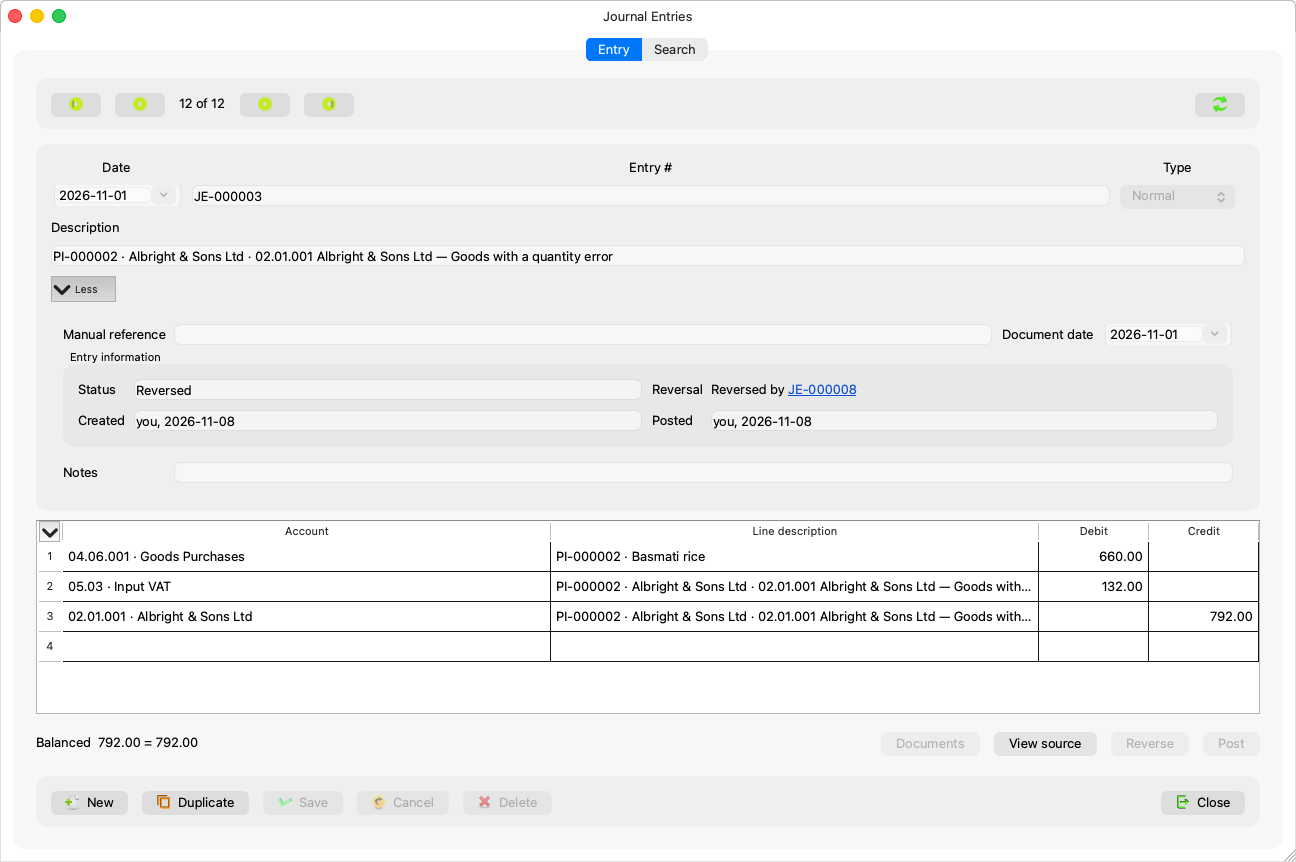
| Field | Meaning |
|---|---|
| Entry # | Generated by the server on save (such as JE-000482); display only. |
| Date | The entry's date; a new entry starts on the date of the last save. |
| Type | Normal, Opening, Adjustment, Correction… — see Entry types. |
| Period | At the Professional level: the period the date falls in, with the tooltip “The period the date falls in. Pick another open period only for a deliberately backdated adjustment.” At the Simple level the field is hidden and the period follows the date. |
| Description | Required: “An entry needs a description.” |
| Status | Draft / Posted / Reversed; “Set when the entry is saved”. |
| More | A disclosure row holding the optional fields — “Manual reference”, “Document date”, “Notes” — and the entry's information: “Created”, “Posted”, “Reversal”. It opens itself while the entry has one of these filled. |
Below the grid the balance line computes live: “Balanced” {debit} = {credit}, or “Difference” and the amount.
Buttons
New, Duplicate, Save (Save && Post where that is the path), Cancel, Delete, Post, Reverse, Documents, View source (on a generated entry), Close — with their shortcuts in Keyboard navigation and the shortcuts table in the settings. Whatever is not allowed on the shown entry has its button disabled, with the reason in its tooltip.
Opening a specific entry
“{number} is outside the current date range.” blocks nothing: an entry you reached from another window (a voucher's source, a reversal) is shown even when the current search results do not hold it. “{number} belongs to another entity. Select that entity first.” means the entry is not the current entity's.