The update notice
Who this page is for
Any user who saw a new-version notice at sign-in, or whose sign-in was refused because their version is too old.
When it appears
Right after your password is accepted, the application asks the server for the newest version available for your system. The notice therefore appears only at sign-in — the session-renewal window that appears while you work never asks about updates.
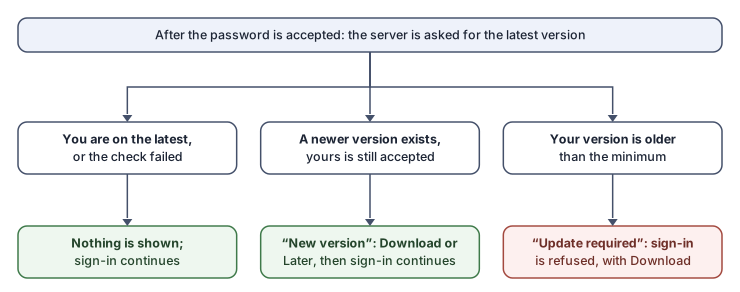
The three possible outcomes:
-
Nothing appears — you are on the newest version, or the check could not run at all (the check never blocks your sign-in).
-
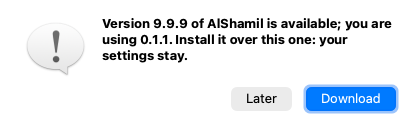
“New version” — a newer version exists and yours is still accepted:
“Version {latest} of AlShamil is available; you are using {current}. Install it over this one: your settings stay.”
Two buttons: Download and Later. Whichever you choose, your sign-in continues normally.
-
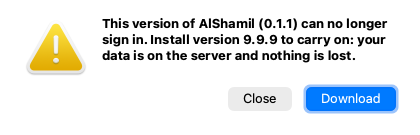
“Update required” — your version is older than the minimum the server accepts, and sign-in is refused:
“This version of AlShamil ({current}) can no longer sign in. Install version {latest} to carry on: your data is on the server and nothing is lost.”
The sign-in window stays open with a Download button.
Steps
- Press Download; the download link opens in your browser.
- Install the new version over the current one — see Installing on macOS or Installing on Windows.
- Start the application and sign in again.
Rules and refusals
- If the download button is missing, the message says: “Ask the support team for the download link.” — the server offers no download link, so ask support directly.
- The update does not touch your data: it is all on the server, and your on-machine settings stay.
Common mistakes
- Postponing the update again and again with Later until the version falls below the minimum, and sign-in is refused at a moment that does not suit you. Update at the first opportunity.