Searching the invoices
Who this page is for
Everyone looking for an invoice on the Search tab — in the purchase and sales windows alike, each within its own invoices and the current entity.
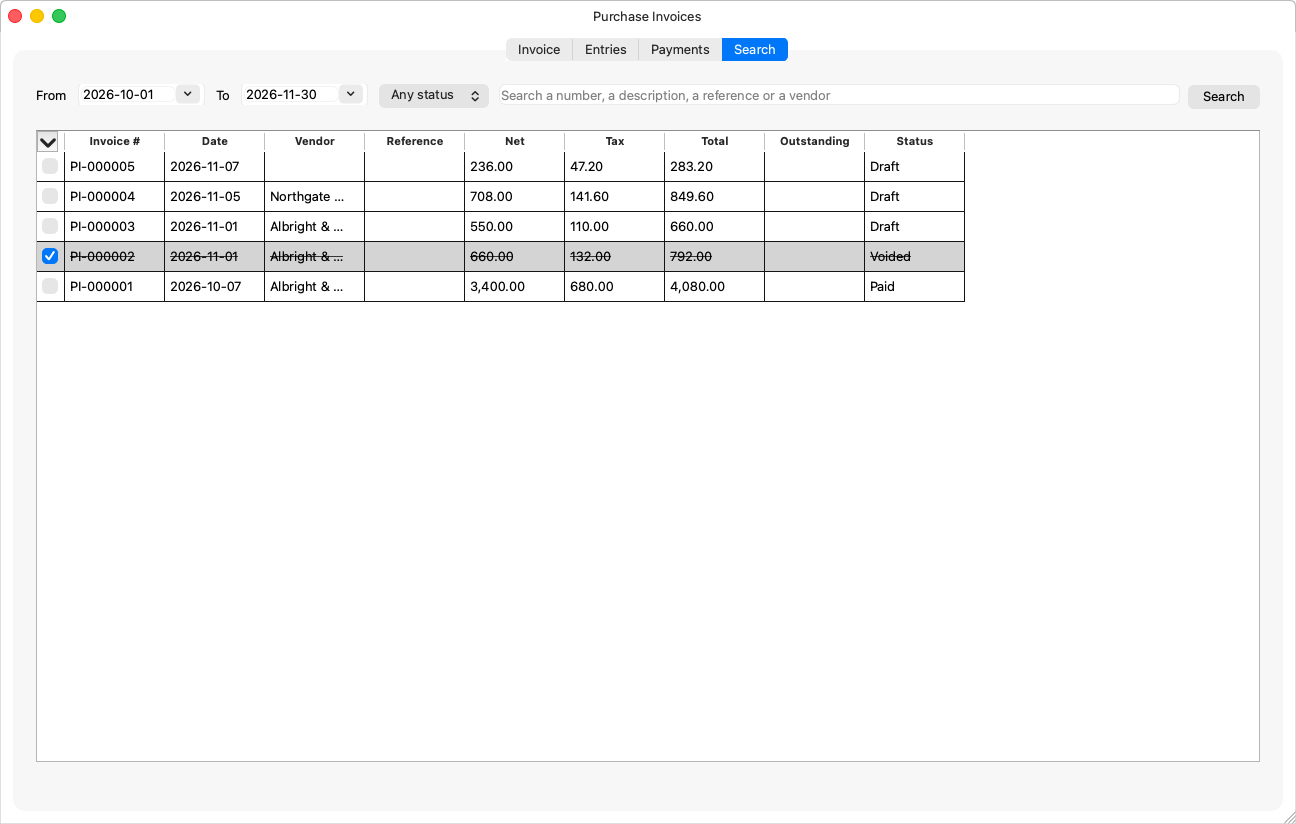
The filters
| Filter | Meaning |
|---|---|
| From / To | The date range; the current month by default. |
| Status | “Any status”, Draft, Posted, Voided, Paid, Partially paid (posted with part of it settled). |
| Text | “Search a number, a description, a reference or a vendor” (in sales: “… or a customer”). |
Press Search: the app asks the server and shows the twenty newest matches — “Showing the {count} newest matches. Narrow the search to find older invoices.” — and clicking a result shows it on the Invoice tab.
The table's columns
The invoice number is fixed; the rest — date, vendor/customer, status, amount, reference… — can be hidden, retitled and resized from Customizing table columns, and each window (purchases and sales) keeps its own saved columns.
Rules the window knows
- The tab is disabled while the shown invoice has unsaved changes: “Save or discard the current invoice first.”
- “No invoice matches this search.” — widen the range or clear the text.
- An invoice you opened from another window (an entry's source, a settlement) is shown even when the results do not hold it.
- A voided invoice stays in the results struck through, so the books' history never disappears.