Generating periods
Who this page is for
For anyone who created a new entity, or whose books have entered a new fiscal year. Periods never create themselves: an entry dated where no period exists is refused — “No accounting period covers this date. Generate it in Accounting Periods.”
What you need first
- The entity selected, and a fiscal year on it: “The entity has no fiscal year. Set one in Entities, or choose a year here.” — the year field in the window sits right before the button.
Steps
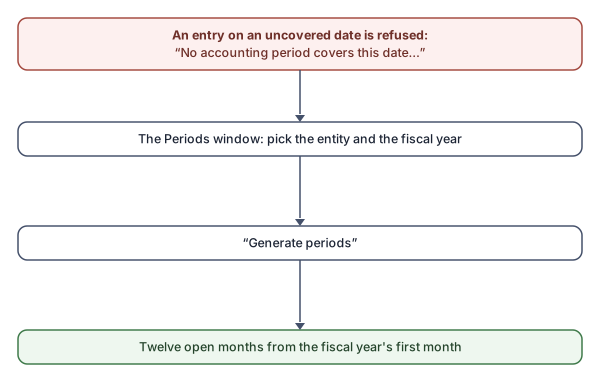
- In the Accounting Periods window (Months tab) choose the fiscal year in its field — it starts on the entity's year.
- Press Generate periods: “Create the twelve monthly periods of this fiscal year for the entity.”
- The table fills with twelve months, all open, starting from the fiscal-year start month chosen when the database was created.
What you see next
Entries, invoices and vouchers dated in this year are now accepted. The next new year needs the same generation again — the first entry dated in it reminds you with the missing-period message.
Rules and refusals
- Generating never duplicates existing periods, nor touches them.
- “The entity has no start date, so its fiscal years cannot be worked out. Set it in Entities.” — complete the entity's data first.
- A year missing a month is named at the year's close: “Months without a period: {months}. Generate the year's periods first.”