Data languages
Who this page is for
Everyone reads it; a group administrator changes it. The Languages tab:
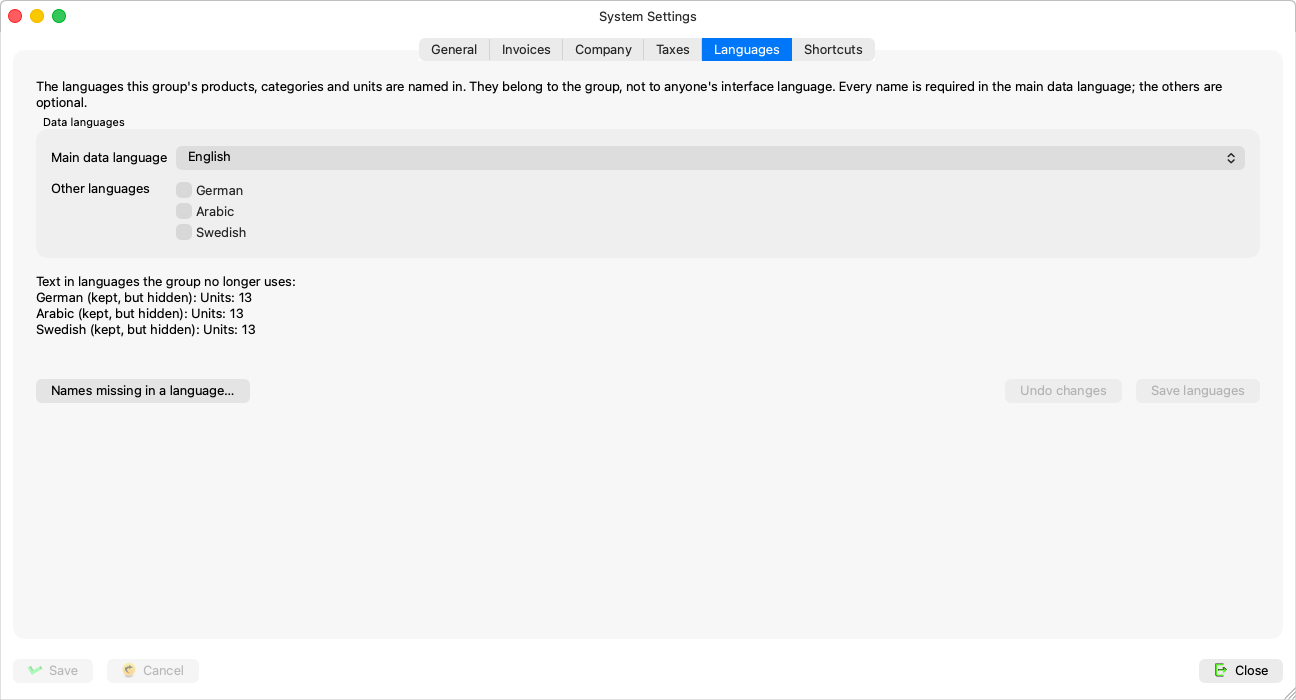
“The languages this group's products, categories and units are named in. They belong to the group, not to anyone's interface language. Every name is required in the main data language; the others are optional.”
The full concept is in Data languages (concept).
What is on the tab
- The main data language — the language every product, category and unit must be named in.
- The other languages — optional; each gets a name field in the Products, Categories and Units windows.
- The Save languages and revert buttons — the change is saved from here, apart from the window's Save button.
- “Names missing in a language…” — “Before changing the main data language: the products, categories and units with no name in a language.” It opens the missing-names window.
Changing the language set
-
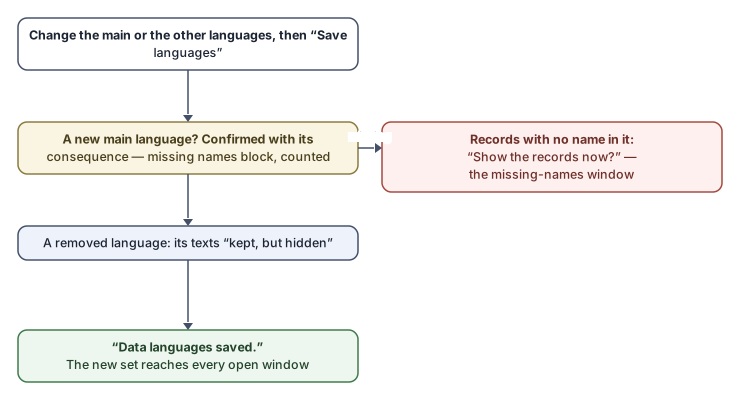
Change the main language or add and remove among the others, then press Save languages.
-
A new main language is confirmed with its consequence:
“Make {language} the main data language? Every product, category and unit must then be named in {language}; the name in {old} becomes optional. Records with no {language} name stop the change, and are counted.”
-
A removed language erases nothing: “Text in {languages} is kept, but hidden until the language is added again.” — and the dormant text is counted under “Text in languages the group no longer uses:”, each line reading “{language}: {counts} -- kept, but hidden.”
-
After “Data languages saved.”, the new set reaches every open window: the name rows are rebuilt and the lists read again.
Rules and refusals
| Message | What it means |
|---|---|
| “{language} cannot be the main data language yet: these records have no {language} name.” | With the offer “Show the records now?” — complete the names first: while the language is among the others, the windows show a field for it; then make it the main one. |
| “A language is chosen twice, or the main data language is also among the others. Check the languages and save again.” | Tidy the two lists. |
| “This group keeps Konzepti's restaurant menu, which shows all four languages. Available after the restaurant-menu update.” | A restaurant group: the tab is read-only until that update. |
| “Only a group administrator may change the data languages.” / “This group is frozen, so its data languages cannot be changed.” | Permission and freezing. |
Common mistakes
- Making a language the main one before its names are complete — add it to the other languages first, fill the names (the missing-names window counts them), then switch.
- Assuming that removing a language erases its text — it stays stored, hidden.
Related pages
- Names missing in a language
- Data languages (concept)
- Units — the first multi-language names window.