Data languages
Who this page is for
For anyone working in a group that names its products in more than one language, or wondering about the multiple name fields in the Units, Products and Categories windows.
Two entirely different languages
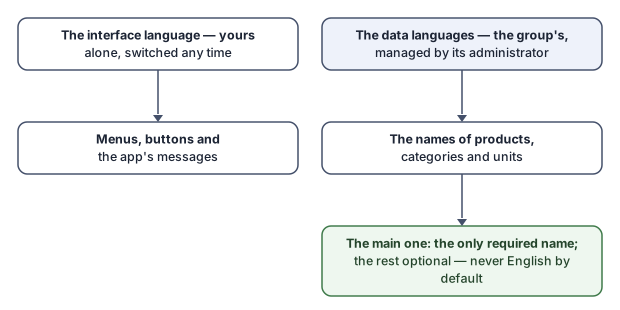
- The interface language is yours: you pick it on the sign-in window or from the Language menu, and it changes the menus, buttons and messages — it never changes a letter of your data (the app language is explained later, in the Settings section).
- The data languages are the group's: the languages its products, categories and units are named in. As the settings screen says: “The languages this group's products, categories and units are named in. They belong to the group, not to anyone's interface language.”
Neither decides the other: a user with a Swedish interface in a group whose main data language is Arabic sees Swedish menus and Arabic product names.
The main data language
Every group has one main data language, chosen when the database is created — and there no suggestion is taken for it: you pick it yourself. The name in it is the only required name of every product, category and unit; names in the other languages are optional, and whatever has no name in a language simply stays empty there — English is never used as a default stand-in. When a name is shown in a language other than the one asked for, it is marked as such instead of passing as a translation.
Changing the main language is a weighty decision, and its question explains it:
“Make {language} the main data language? Every product, category and unit must then be named in {language}; the name in {old} becomes optional.”
If there are gaps: “{language} cannot be the main data language yet: these records have no {language} name.” — and the missing-names window lists them record by record for you to complete.
Adding and removing a language
The languages are managed on the Data languages tab of Accounting Settings, by a group administrator. A removed language does not erase its texts: “{language}: {counts} -- kept, but hidden.” — they return when the language does. And a group that still keeps Konzepti's restaurant menu cannot change its languages here yet: “This group keeps Konzepti's restaurant menu, which shows all four languages. Available after the restaurant-menu update.”
Where you meet this in daily work
The Units, Products and Categories windows show one row of name fields per group language, the main one first and starred; and the search grids one name column per language. A single-language group sees a single field — no English field in an Arabic-only group.